How does the adjust exchange rate batch job impact your general ledger in Business Central?
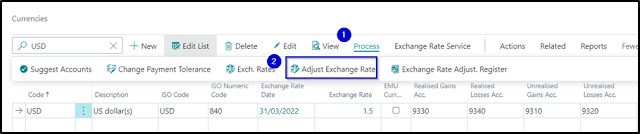
The adjust exchange rate batch job is typically run on Month End. It will calculate differences for the individual currency balances for each open foreign currency transaction and post it to the unrealised gains/losses account. This will also adjust the sub-ledger entries (i.e., Vendor, Customer, Bank Ledger Entries). To run Adjust Exchange Rate navigate to the Currencies List > Actions as shown below: This will open a request page which will enable you to select the date range and as well as other filters to process the adjustment. Note: The Posting Date is important as this will determine the effective exchange rate that will be the basis of calculating the currency fluctuations. Once the batch job processing is completed, it will be posting the entries to reflect the unrealised gains/loss. In the example above, the purchase invoice posted on 1/03/22 has recorded $5,200 AUD in the payable account. With the new exchange rate on 31/03/22, your payable account balan...
