How to Copy General Journals in Business Central?
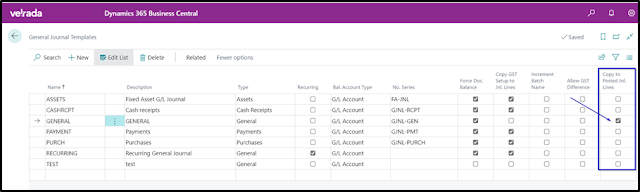
When this option is selected, it specifies whether the journal lines to be copied to posted journal lines of the selected journal template. When you enable this field, when posting the journal lines from this template, the program copies the lines to the Posted General Journal page. From there, you can copy the lines back to the journal, which can be useful when you want to correct entries. Select your target journal template, batch, and posting date. In this example I updated the posting date and assigned a new Document No. You can also choose to reverse the sign if you wish to reverse out the original general journal. The new general journal batch is now available for review and posting. It has the updated date, document number and negative amount. Thank you for reading. Hope you find it interesting. #businesscentral #msdyn365bc #erpconsulting #microsoft #businesscentral #copygeneraljournals #postedgeneraljournal
