Posts

Progressive Billing in Business Central

Image
   Progressive billing is commonly used in industries with long-term projects that can take months or even years and involve significant costs. Although it is commonly associated with construction, incremental billing based on project milestones can be applied to other businesses as well. While the concept of progress billing is simple, there are some nuances to consider during execution. Fortunately, Business Central offers various options in the Jobs area to assist with this, eliminating the need for concern. For our example, let's say you have a construction job that needs 10 windows installed, each costing $200 to install, totalling $2,000. Here's what you can do: 1. Make a job for the window installation. 2. Add a task to the job for the window installation. In the job task, create planning lines for your items and resources. Depending on how you set this up, it'll affect how you bill. Create one planning line for the 10 windows. 4. When you're ready to bill 80%, ...

Attributes for Items in Dynamics 365 Business Central

Image
 Looking for an effective method to classify your items in Business Central according to your custom criteria? Item Attributes might be the perfect solution! Item Attributes are customizable classifications that you can assign to your products, simplifying the process of searching, filtering, and report generation. For example, a Marketing team can leverage attributes to categorize products, facilitating organization, arrangement, and filtering for catalogues or websites.  Benefits of using Item Attributes: Perfect for storing product-related information that may not have a dedicated location. Excellent tool for Sales and Marketing teams to classify and locate items using various criteria. Easy to configure and operate. Quick filtering capabilities – allows users to seamlessly filter products by attributes. Database relationships in Business Central:  Between tables 27 Items and 7505 Item Attribute Value Mapping requires the use of the Item ID field. Between tables 7505...

Understanding Deferred GST: What You Need to Know and how to handle it in Business Central

Image
 If you're a business owner in Australia, you've likely come across the term "Deferred GST" in your financial reporting. Deferred GST is an accounting concept that relates to Goods and Services Tax (GST) payments, and it can have a significant impact on your cash flow and financial statements. In this post, we'll take a closer look at Deferred GST, what it is, and how it works. What is Deferred GST? Deferred GST is the amount of GST that a business has collected on sales but has not yet paid to the Australian Taxation Office (ATO). The ATO requires businesses to report GST on a quarterly basis through a Business Activity Statement (BAS). However, there are situations where businesses are allowed to defer the payment of GST until a later date. For example, if a business purchases goods or services on credit and doesn't pay for them until a later date, the GST on those purchases can be deferred until the payment is made. This is because the business hasn't ...

Controlling Job Costs and Prices in Microsoft Business Central with Jobs and Work Type Codes

Image
Microsoft Dynamics Business Central offers a powerful solution for managing job costs and prices by utilizing work type codes. By assigning work type codes, you can easily manage resource rates based on various factors such as location, type of work, and more. With Business Central, you have the ability to set up a general rate for a resource on the Resources card, but can also adjust the rate based on the specific work type code. In addition to setting up rates based on work type codes, you can also make adjustments to the cost based on fixed costs or added dollars or percentage. The use of work types on job planning lines directly impacts your expected cost and budget, making it an invaluable tool for cost control. To set up this process, follow these steps: 1. Define Work Types and set up the corresponding Unit of Measure Code in Business Central. 2.Set up Resources , including  “Cost” and “Prices” in Business Central. 3. In addition to the cost specified on the resource card,...

Sent Email History Made Easy: Tips for Business Central

Image
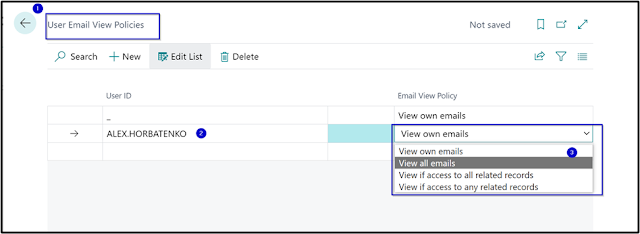
   Clients often ask how to view all sent emails from within Business Central. Dynamics 365 sends emails through the associated Outlook account, or the account set up in email scenarios, and these emails can be accessed in the sent mailbox of either account. However, clients may not always have access to these accounts to troubleshoot email issues or verify whether an email was sent. Fortunately, this can be resolved in Business Central with a few easy steps. To solve this problem, here are the steps to follow to grant permissions to view all sent emails in Business Central:    As an admin user, or by being granted permission to the table, search for "Email User Policies" inside Business Central.    Add the user who needs to view the emails and their policy by selecting "new" and a user from the available options.    Here are the options available:  View own emails: The user can view only their own email messages. View all emails: The user...

Unlock your potential in the tech industry with the Microsoft Certified Trainer (MCT) certification program!

  The Microsoft Certified Trainer (MCT) certification program is a valuable opportunity for professionals in the tech industry. This certification recognizes trainers who provide Microsoft training courses and requires passing specific exams and demonstrating teaching skills. Once certified, MCTs gain exclusive access to training resources, benefits, and a global community of like-minded professionals.  Here's how obtaining MCT certification can benefit your career: * Leverage Your Current Skills and Knowledge : The MCT program allows you to leverage your existing skills and knowledge of Microsoft technologies, recognize your expertise, and enhance it by teaching others. * Establish a Positive Industry Reputation: Becoming an MCT can help you establish a positive reputation in the industry, supporting your profile to employers and peers that you have the required knowledge and expertise to train others. * Unlock New Career Opportunities : By becoming an MCT, you ca...

How to Edit Posted Documents in D365 BC: Quick and Easy Steps

Image
Editing a posted invoice document used to be a hassle. You had to develop a page or form and assign permissions to it, just to make a simple change. But, rejoice! Microsoft has now made it easy to edit your posted sales invoices in D365 BC. With just a few clicks, you can update your Posted Sales Invoices, Posted Purchase Invoices, Return Shipments, and Return Receipts. Here's how based on an example of editing Posted Sales Invoice: 1. Go to the search bar and type "Posted Sales Invoices". 2. Select the  "Update Document"  option in the  "Process"  button. 2. Select the "Update Document" option in the "Process" button. Edit the information on the new page that pops up and press "OK". For now three Payment fields are available for editing: 1. Payment Method Code 2. Payment Reference 3. Company Bank Account That's it! Your updated information will now be displayed on the Posted Sales Invoice Document. And that's no...